


PrivaClean — Phone Cleaner
4.36.00 Reviews
App Specs
- Version
- V1.0.4
- Updated On
- License
- Free
- Downloads
- 500,000+
- Developer
- Ahmed Abou Zamil
- Categories
- Tools
- Platform
- Android
Screenshots
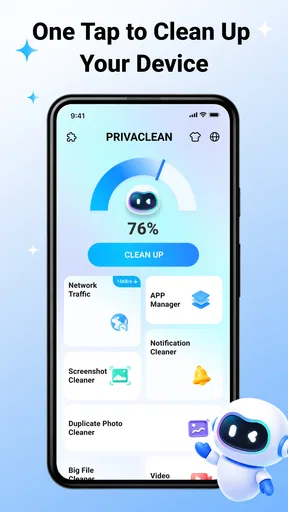
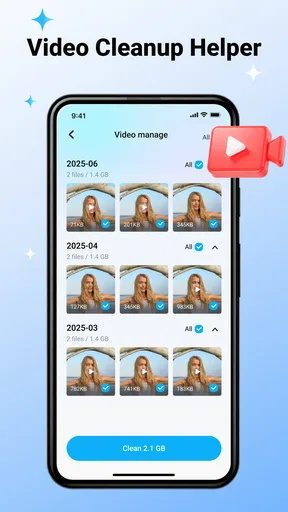
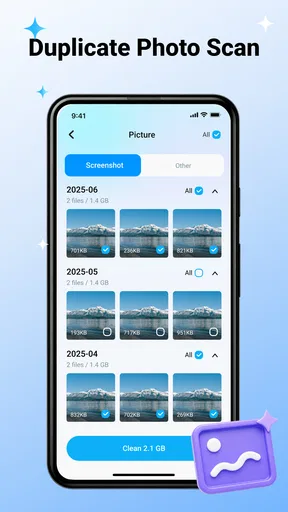
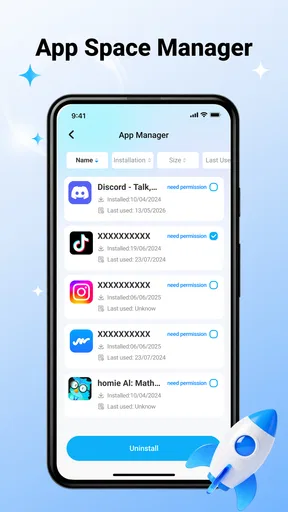
 Analysis by AppCompare
My phone-cleaning test began with a familiar problem: photos, videos, downloads, and leftover files had gradually turned everyday storage into a guessing game. I wanted a tool that could help me sort the clutter without making me delete something important by accident. That is the practical space occupied by PrivaClean, a free tools app from Ahmed Abou Zamil. It is aimed at people who want a clearer route through personal files rather than another complicated maintenance suite.
The app’s central promise is easy to understand: help remove junk and organize photos, videos, and files with more confidence. In my experience, that wording matters. A cleaner is only useful when it helps me distinguish disposable clutter from material I still need. PrivaClean feels most relevant when the phone has become untidy through ordinary use—saved media, old downloads, and files that no longer have an obvious purpose.
It is available for everyone, and its broad audience is one of its strengths. I would not describe it as a specialist system-management tool for advanced users. Instead, I see it as a practical starting point for someone who wants to regain control of a crowded device without learning a technical vocabulary first.
From a crowded phone to a more deliberate cleanup
I look at a crowded phone as a shared space only when the people using it have agreed on whose files are whose; otherwise, a cleanup can cross an invisible boundary. This section focuses on how to make that distinction before starting, then turns to the small setup choices that help keep a routine cleanup deliberate rather than rushed.
Beginning with the real problem, not a dramatic promise
The best way to approach PrivaClean is to begin with a specific storage problem. If I open a cleaner app while feeling rushed, I am more likely to approve a broad deletion than I should. A better workflow is to decide whether I am dealing mainly with unwanted images, oversized videos, forgotten downloads, or a general mixture of files. That small decision gives the scanning process a purpose and makes the later review much safer.
This is also where the app’s privacy-focused name sets a useful expectation. I would still treat every cleanup screen as a decision point, not as an automatic instruction to erase. The word “private” should encourage careful handling of personal media, not replace it. Family photos, work documents, screenshots containing information, and exported conversations can look like ordinary clutter while remaining valuable.
For that reason, I recommend starting with one category at a time. Photos are usually easier to judge visually, while files and downloads often require opening or remembering their source. Videos deserve extra patience because a single item can be large but still important. The strongest experience comes from using the app as a review assistant rather than handing it complete control over the phone’s storage.
Worth Reading Before You Choose

EA SPORTS FC Mobile 26 Is a Bigger Football Game, but It Takes Time

Flipboard Shows What News Apps Must Do Beyond the Feed

Switching to Android Auto Means Rethinking Your Driving Routine

Google Calendar Makes a Crowded Week Easier to Manage

Ludo King Makes the Most of the Minutes Between Plans

Baby Panda World Brings Quick Play to Modern Phones, but Its Game Library Feels Busy
Moving through the cleanup flow
PrivaClean is designed around the kind of organization people expect from a phone cleaner: identify material that may no longer be needed, present it for consideration, and help the user remove selected items. The useful handoff is between discovery and judgment. The app can bring scattered clutter into view, but I remain responsible for deciding what belongs in the bin.
That distinction is more important than it sounds. A file can be old without being useless, and a recently created file can be accidental. A screenshot from last week might be disposable, while a document downloaded months ago might be needed for a tax form or travel booking. I found that the app is most valuable when it reduces the search effort without pretending that age alone determines value.
A sensible routine is to review the suggested material in small batches. I would first remove obvious duplicates or temporary-looking items, then pause before handling mixed folders. After each batch, I would check whether the phone behaves as expected and whether the freed space solves the immediate problem. This staged approach is less dramatic than a single large cleanup, but it reduces the chance of turning a storage issue into a recovery issue.
One non-obvious benefit of this workflow is that it can reveal habits rather than merely delete files. If the same type of download keeps returning, the problem may be the way I use a browser or messaging app, not the storage itself. If screenshots dominate the photo area, a cleaner can expose that pattern and encourage a better habit afterward. The app therefore works best as a prompt for maintenance, not a permanent substitute for it.
Handling photos and videos with care
Visual files are where confidence matters most. A list of filenames can make personal media feel abstract, but photos and videos often carry memories that are difficult to replace. When using PrivaClean for this material, I would examine thumbnails, dates, and context rather than selecting large groups simply because they appear together.
My practical rule is to separate “clearly disposable” from “possibly important.” Blurry accidental shots, repeated screenshots, and media saved only for a short-lived purpose are good candidates for review. Images from family events, work projects, or travel should be handled separately, even if they sit beside obvious clutter. This is one of the places where a few extra minutes are worth more than a quick storage gain.
Videos need an additional check because their size can make them tempting targets. A long recording may be the item that releases the most space, but it may also be the only copy of something meaningful. I would open or verify anything that looks personally significant before removing it. If I already have a trusted backup elsewhere, that changes the decision; if I do not, I would keep the file until I have made one.
Another useful tactic is to clean after an event rather than waiting for the phone to become full. After a trip, celebration, or work project, I can review the temporary images while I still remember why they were created. That makes PrivaClean’s organization role more effective because memory supplies context that a file list cannot.
Sorting ordinary files and downloads
Files are less visually obvious than photos, so this part of the process benefits from a slower handoff. A download might be an expired menu, an installation package, a duplicate document, or something I deliberately saved for offline use. I would not treat a generic filename as proof that the item is safe to remove.
For everyday maintenance, I would begin with files whose purpose is immediately clear. Old exports, duplicate attachments, and one-time reference material can often be evaluated quickly. Items with unfamiliar names should stay in a separate mental group until I can identify them. This is a concrete advantage of using a cleaner deliberately: it turns a vague “my phone is full” complaint into a sequence of small decisions.
The trade-off is that a cautious review takes longer than an aggressive cleanup. That is not a flaw unique to this app; it is the unavoidable cost of protecting personal information. PrivaClean can make the material easier to inspect, but it cannot know whether a document matters to me. Anyone expecting a single tap to produce a perfectly safe result may find the process less automatic than imagined.
The handoff between the app and the user
The most important handoff is not between PrivaClean and the storage system. It is between the app’s organization and my own memory. The app can surface candidates, but I supply the context: whether a screenshot is still needed, whether a video has been backed up, or whether a downloaded file is part of an unfinished task.
I also prefer to keep a simple record of what I am about to remove when the material is sensitive. That might mean noting a document’s purpose or checking that a photo exists in another trusted location. This extra step is especially worthwhile before a large cleanup. It makes the process feel controlled rather than irreversible, even when the app is designed to simplify it.
For a shared household phone, I would be even more careful. A person may recognize their own clutter but not another family member’s files. The app is suitable for personal maintenance, yet the user should not assume that every visible item belongs to them or is safe to erase. The clearer the ownership, the better the result.
What the result feels like
A successful session with PrivaClean is not simply a smaller file count. The better outcome is a phone whose remaining content is easier to understand. When obvious clutter is removed and important material is left alone, future maintenance becomes less intimidating. I can find the files I need more quickly, and I am less likely to postpone cleanup until storage becomes urgent.
The app’s free price helps here because it lowers the barrier to trying a careful workflow. I do not need to make a large commitment before deciding whether its approach fits my habits. Its current version, V1.0.4, is also useful context for expectations: I would approach it as a focused cleaner and organizer, not assume it replaces every storage or backup tool I use.
Its reception suggests that the basic idea is connecting with users. PrivaClean holds a 4.3 average from over four hundred ratings and has passed half a million installs. Those figures do not guarantee that every phone will feel the same, but they indicate that the app has found a real audience for this straightforward cleanup task.
In practical terms, I would expect the biggest improvement on a phone where clutter is spread across personal media and ordinary files. The result may feel less dramatic on a recently reset device or one already managed carefully. That is not a reason to dismiss it; it simply means the value depends on the starting condition.
Where the workflow can break
The first point of friction is user attention. A cleaner can organize a large amount of material, but the more personal the files are, the less sensible it is to approve everything quickly. Someone who wants completely automatic deletion may find PrivaClean too dependent on their judgment, while someone who values control will see that same requirement as a safeguard.
The second limitation is that organization is not the same as backup. Removing clutter can make space, but it does not create a secure copy of the files I keep. I would not use a cleanup session as a substitute for backing up important photos or documents. If my main concern is protecting irreplaceable material, a dedicated backup solution is the better first choice.
There is also a difference between visible clutter and the deeper causes of storage use. If a messaging service continually saves media, or if I repeatedly download large files, cleanup may provide only temporary relief. PrivaClean can help me find the results of those habits, but I still need to change the source behavior. Otherwise, the same review will become a recurring chore.
Another situation where I would choose a different option is when I need advanced file management, detailed storage analytics, or specialized recovery controls. PrivaClean’s appeal is its focused, approachable role. Users who want a full technical dashboard may prefer a more feature-heavy file manager or the storage tools already built into their phone. More features can offer deeper control, although they can also make routine cleanup harder to understand.
Who should use it and who should skip it
I would recommend PrivaClean to someone whose phone feels messy rather than technically broken. It suits people who accumulate screenshots, saved media, old downloads, and miscellaneous files, then want help reviewing them in one place. It is also a reasonable choice for users who prefer a gentle, category-based process over manually opening folders through a standard file manager.
It is particularly useful before a trip, after a large event, or when a phone is approaching its storage limit and the owner wants to make informed choices. In those situations, the app can turn a stressful search into a manageable sequence: identify the category, inspect the candidates, remove only what is clear, and reassess the result.
I would skip it if I am looking for a hands-off guarantee that nothing important will ever be deleted automatically, or if my real need is cloud backup rather than cleanup. I would also be cautious if I am unwilling to review personal files. No cleaner can replace that responsibility, because only the owner knows which memories and documents matter.
Compatibility and everyday fit
PrivaClean supports devices running Android 7.0 or later, which gives it a broad practical range for Android users. That makes it relevant not only to newer phones but also to older devices that may be more affected by limited storage. On an older phone, I would still treat cleanup as one part of maintenance rather than expect it to solve every performance complaint.
The everyone age rating matches the app’s general purpose and makes it approachable for ordinary household use. Even so, I would explain the cleanup process to less experienced users before letting them remove files. Simple presentation does not eliminate the need for a second look when personal media is involved.
My preferred routine would be short and repeatable. I would open the app when I have time to review, start with the clearest category, remove only items I recognize, and stop if the remaining files become ambiguous. That rhythm is more sustainable than waiting until the storage warning creates pressure. It also gives me a chance to notice which habits are filling the phone again.
My final take on the cleanup experience
PrivaClean works best when I treat it as a clear sorting desk for a crowded phone. Its value comes from bringing photos, videos, and files into a cleanup workflow that encourages a decision before deletion. The free price, broad Android compatibility, and accessible everyone rating make it easy to consider, while the response from its user base suggests that the approach is useful for many everyday situations.
I would not present it as a replacement for backup, a complete file-management system, or a magic fix for every storage problem. Its limitations become clear when the user expects total automation or needs advanced technical controls. But for the common problem of accumulated digital clutter, it offers a sensible middle ground between doing everything manually and deleting without thinking.
My recommendation is to use PrivaClean slowly, in focused passes, and with personal files treated as decisions rather than junk. If that matches the way you want to manage your phone, Ahmed Abou Zamil’s tool is a practical companion for turning an overloaded storage area into something easier to understand and maintain.
Pros
- Quickly identifies junk files
- cached data
- and leftover app files.
- Simple interface makes routine phone maintenance easy for most users.
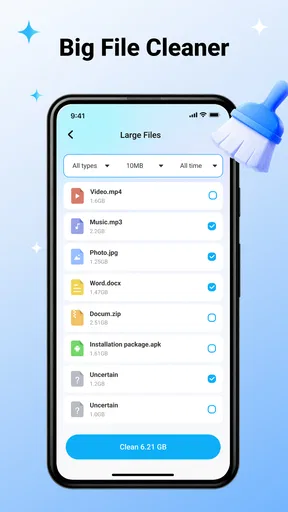
- Helps locate large files that may be occupying unnecessary storage space.
- Useful privacy tools can highlight traces left by apps and browsing activity.
- Scanning and cleanup controls are straightforward
- with little setup required.
Cons
- Some cleanup suggestions may require careful review to avoid deleting useful files.
- Features and scan depth can vary depending on the Android device and system version.
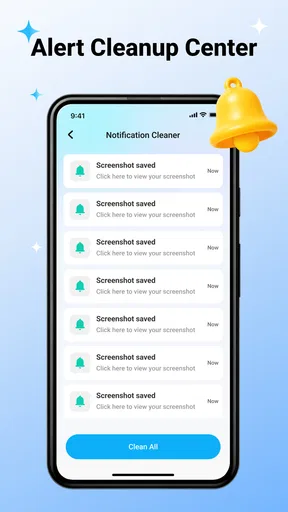
- Frequent notifications or upgrade prompts may interrupt the cleaning experience.
- Cleaning temporary files does not guarantee a noticeable improvement in performance.
- Privacy-related results may be limited compared with dedicated security applications.
FAQs for PrivaClean — Phone Cleaner
What is PrivaClean — Phone Cleaner, and what does it do?
PrivaClean — Phone Cleaner is designed to help users review and organize storage on an Android or iOS device. Its typical functions may include identifying unnecessary files, cached data, duplicate or large items, and privacy-related traces such as browsing or app activity. Before using any cleaning option, review the results carefully, because some files may still be useful even when the app classifies them as removable.
Can PrivaClean safely delete important photos, videos, or documents?
PrivaClean may help locate files that appear unnecessary, but no cleaner can always understand the personal importance of every item on your phone. A recommended approach is to preview the proposed deletions and manually deselect anything you want to keep. Back up important photos, videos, contacts, and documents before cleaning, particularly when using an automatic cleanup feature or removing duplicate files.
Does PrivaClean improve phone performance or battery life?
A cleaner can sometimes free storage space and remove temporary data, which may make a device feel less crowded or resolve problems caused by extremely low storage. However, PrivaClean cannot guarantee a noticeable speed or battery improvement on every phone. Modern operating systems already manage memory and background processes, so repeated cleaning may offer limited benefits and should not replace software updates or removing truly unused apps.
Is PrivaClean free to use, and are there subscriptions or in-app purchases?
The available features, advertising, trial periods, and premium tools can vary depending on the version, operating system, country, and app-store listing. Before downloading or starting a trial, check the current PrivaClean product page for pricing and subscription details. Pay particular attention to renewal terms, billing frequency, and cancellation instructions, since deleting the app alone may not cancel an active subscription.
What permissions and privacy information should I check before installing PrivaClean?
A phone-cleaning application may request access to storage, photos, media, or other device information so it can scan and categorize content. Grant only the permissions required for the feature you intend to use, and review PrivaClean’s current privacy policy and app-store disclosures before proceeding. Avoid assuming that a privacy-focused name means no data is collected; verify how scans, diagnostics, and personal information are handled.


